 blog
blog
High Quality Laser Engraving for Gifts: 2026 Guide
Table of Contents
- What Makes Laser Engraving for Gifts High Quality
- Best Materials for Laser Engraving Gifts
- Gift Ideas That Show Off Precision Craftsmanship
- Laser Engraving vs Laser Etching: What the Difference Means for Your Gift
- How to Prepare Files for Laser Engraving
- Gift Ideas That Show Off Precision Craftsmanship
- How Long Engraved Gifts Last, by Material
- Sustainability and Eco-Friendly Engraving Options
- Conclusion
- Frequently Asked Questions
Last Updated: September 11, 2026
What Makes Laser Engraving for Gifts High Quality
High quality laser engraving for gifts comes down to three measurable factors: precision, engraving depth, and surface finish. Get any one wrong and the piece looks mass-produced.
A personalized item can arrive with washed-out contrast, fuzzy edges, or a design so shallow it disappears within months. The problem isn't the concept, it's the execution.
Precision, Depth, and Surface Finish
Precision is how closely the engraving matches the original artwork, down to the thinnest line.
Engraving depth determines whether the mark is permanent or cosmetic. Shallow marks wear away; proper depth cuts into the material itself.
Surface finish covers how the engraved area looks after the laser stops. Clean edges, consistent contrast, and no burn residue separate professional work from a rough attempt.
A design can look beautiful on screen and still fail if depth and focus aren't matched to the surface, which is why the same file produces different results across materials.
Best Materials for Laser Engraving Gifts
The best materials for laser engraving gifts are wood, leather, acrylic, anodized metal, and glass, each chosen for how well it holds fine detail and resists wear.
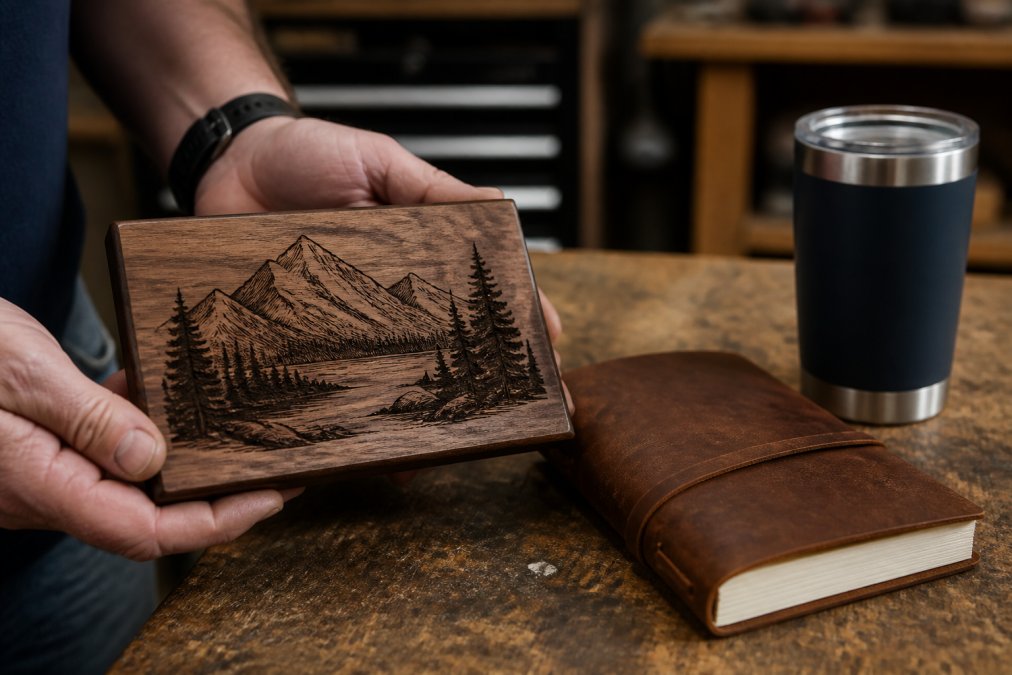
What matters is how each material ages, what it tolerates, and what ruins it.
Wood, Leather, and Acrylic
Hardwoods (walnut, maple, cherry) hold intricate detail because their grain is tight and consistent. The engraved area exposes raw, lighter wood beneath the finished surface, giving natural contrast without added color. Over years indoors, the surrounding finish may amber while the engraved recess stays lighter, a patina most people find attractive. Moisture and direct sun are the failure modes: humidity raises the grain and blurs fine lines, and UV fades the surrounding stain faster than the engraving.
Softwoods (pine, basswood) engrave faster but char at the edges when laser power is too aggressive, leaving a brown halo. Fine for rustic pieces, less so for fine monograms.
Leather darkens where the laser hits, creating contrast without ink or dye. Full-grain leather develops a patina, and the engraving darkens with it rather than wearing off. The real risk is conditioning: heavy oil or wax over an engraved area softens the mark, so condition lightly and away from the engraving.
Acrylic engraves to a frosted white that pops against colored sheets. It resists fading and moisture but scratches, a daily-carry keychain shows scuffs long before the engraving fades. Best for display pieces.
Anodized Metal and Glass
Anodized aluminum is the durability champion (asminternational.org). The laser removes the colored anodized layer to reveal the silver metal beneath, creating a mark that is physically part of the surface, it won't fade, chip, or wash off. The metal can dent or scratch, but the engraving survives. That's why anodized tumblers, dog tags, and business card holders are the go-to for daily use.
Stainless steel behaves differently. Without a coating, the laser anneals the surface rather than cutting it, producing a dark, oxidized mark, permanent but lower-contrast than anodized aluminum.
Glass is etched, not engraved, the laser creates controlled microfractures that appear frosted white. The mark is permanent, but the material is fragile, so treat a glass award or commemorative piece as a display item.
| Material | Detail Held | How It Ages | Daily-Wear Verdict |
|---|---|---|---|
| Hardwood | High | Develops patina; engraving stays lighter | Excellent indoors |
| Leather | Medium | Darkens with use; engraving deepens | Excellent |
| Acrylic | High | Resists fading; scratches easily | Display only |
| Anodized metal | High | Permanent; metal may dent | Best for daily use |
| Stainless steel | Medium-High | Permanent, lower contrast | Very good |
| Glass | Medium | Permanent but fragile | Display only |
Gift Ideas That Show Off Precision Craftsmanship
The gifts that best showcase high quality laser engraving for gifts are keepsakes, monograms, and corporate recognition items, because each one depends on fine detail to feel personal. Generic gifts don't reward precision; these do.
Keepsakes, Monograms, and Corporate Recognition
Keepsakes like engraved photo frames, memorial plaques, and anniversary pieces turn a moment into something permanent. Photo-engraving on wood or metal captures a likeness with surprising detail when the source image is sharp. The quality tell is tonal range: a good photo engraving shows distinct midtones and highlights, not a flat silhouette. If a provider can't show a sample on the exact material you're considering, that's a warning sign.
Monograms are where precision really shows. A single intertwined letterform tests an engraver's control, because a monogram has nowhere to hide: every wobble in the vector path, every inconsistency in laser focus, every variation in material density shows up as a visible flaw. If a provider can nail a clean three-letter monogram on hardwood, they can handle almost anything.
Corporate recognition items, such as award plaques, branded tumblers, and employee milestone gifts, need consistency across a bulk order. For marketing managers and HR teams, uniformity separates a professional run from a homemade one. The hidden variable is material batch consistency: two walnut blanks from different suppliers can engrave at noticeably different contrast levels. A provider who sources from a single mill and runs a test piece before the full batch is protecting your brand.
The Design-to-Product Quality Chain
The quality of a finished engraved gift is determined before the laser ever fires. Any weak link shows up in the final piece.
- Source artwork, vector files (SVG, AI, EPS) scale cleanly; raster images need 300 DPI minimum.
- File preparation, text converted to outlines, stray nodes removed, paths closed.
- Material selection, matched to the intended use, not just the aesthetic.
- Laser settings, power, speed, and focus tuned to the specific material batch.
- Post-processing, residue cleaned, edges finished, hardware attached.
A provider who controls all five steps produces consistent work; outsourcing any introduces variability you'll see in the finished gift.
Laser Engraving vs Laser Etching: What the Difference Means for Your Gift
Laser engraving cuts into the material and removes a layer, creating a recessed mark with real depth. Laser etching melts or alters the surface without cutting deep, producing a shallower mark.
That distinction matters when choosing a gift. Engraving lasts longer because the mark is physically part of the material; etching suits a subtle, lighter touch on coated metals or certain plastics. For a keepsake handled for years, engraving is the safer bet; for decorative pieces where appearance matters more than wear resistance, etching can deliver a cleaner look. Ask which method your provider uses and why, a professional matches the technique to the material and intended use, not default to one for everything.
How to Prepare Files for Laser Engraving
Preparing files for laser engraving means converting your design into vector graphics at the correct resolution, with clean lines and no stray pixels. Good files produce sharp results; poor files produce the blurry, pixelated output customers complain about.
This step often determines whether a personalized gift looks custom or amateur. You don't need design software experience, you need to understand what the engraver's software does with your file.
Vector Graphics, Resolution, and Design Templates
Vector graphics are the gold standard because they scale without losing quality. Built from mathematical paths rather than pixels, they keep a logo crisp whether engraved small or large, and the laser follows those paths directly.
If you only have a photo or raster image, at least 300 DPI gives the best starting point (printwiki.org). Lower-resolution images often can't be rescued: the laser needs a defined edge to follow, and a low-resolution image has none, just a grid of colored squares the software must guess between.
Design templates help beginners skip the guesswork. Many providers offer pre-built layouts for monograms, name plates, and recognition awards.
The File-Prep Decisions That Actually Matter
Most checklists tell you to "use vector files." Here's what that means in practice.
Line weight minimums. Lines below roughly 0.25 mm can disappear or break apart during engraving, especially on wood (makezine.com). Thicken hairline details before submitting.
Text as outlines. Converting text to outlines (paths or curves) removes any dependency on the engraver's installed fonts. Send live text in a font they don't have and their software substitutes another, changing your design without anyone noticing until the piece is cut.
Closed paths and no overlaps. Open paths and overlapping shapes confuse the laser's path-following logic, producing double-burned edges or gaps. Clean up in any vector editor before sending.
Black-and-white clarity. Engraving software typically reads black as "engrave" and white as "leave alone." Grayscale and color add ambiguity, so convert your design to pure black and white.
Bleed and margins. For items with edges (tumblers, plaques, tags), keep the design inside the safe area. Engraving too close to a curved edge distorts it because the laser's focal distance changes across the curve.
Here's a simple file-prep checklist:
- Use vector format (SVG, AI, or EPS) whenever possible
- Keep raster images at 300 DPI or higher
- Convert all text to outlines or paths
- Remove stray nodes and open paths
- Provide a black-and-white version for clarity
- Check that no line is thinner than about 0.25 mm
- Keep the design inside the material's safe area
Gift Ideas That Show Off Precision Craftsmanship
The gifts that best showcase high quality laser engraving for gifts are keepsakes, monograms, and corporate recognition items, because each one depends on fine detail to feel personal. Generic gifts don't reward precision; these do.
Keepsakes, Monograms, and Corporate Recognition
Keepsakes like engraved photo frames, memorial plaques, and anniversary pieces turn a moment into something permanent. Photo-engraving on wood or metal captures a likeness with surprising detail when the source image is sharp.
How Long Engraved Gifts Last, by Material
Durability depends almost entirely on material and engraving method. Anodized metal engravings can last decades with normal handling, while glass remains vulnerable to impact regardless of how well it was engraved.
- Anodized metal: The mark is permanent and won't fade. The metal itself can dent, but the engraving holds.
- Hardwood: Durable for decades indoors. Keep it away from prolonged moisture and direct sun, which can fade the surrounding finish.
- Leather: Ages gracefully and develops character. The engraving darkens over time rather than wearing off.
- Acrylic: Resists fading but can scratch. Best for display pieces rather than daily handling.
- Glass: The etching is permanent, but the material is fragile. Treat it as a display item.
If the gift will be used daily, choose metal or hardwood. If it's meant to sit on a shelf, glass and acrylic are perfectly good choices.
Sustainability and Eco-Friendly Engraving Options
Laser engraving is a comparatively low-waste process, but the material and how it's sourced determine the real environmental impact.
Wood from responsibly managed sources, natural leather, and recyclable metals all reduce a gift's footprint. The laser process uses no inks, solvents, or chemical etchants, keeping the finished piece free of toxins found in some printing methods.
For businesses sourcing branded merchandise, choosing a durable engraved item over a disposable printed one is a sustainability decision in itself. Ask your provider where their materials come from, a professional operation will have a clear answer.
Conclusion
Choosing a gift that looks custom, not mass-produced, comes down to understanding precision, material, and method before you order. Most disappointment traces back to a provider who skipped those steps.
Our custom laser engraving service transforms ordinary items into personalized treasures, for individual gift-givers and businesses sourcing branded merchandise alike.
Get started with Swift Creek Giftworks and turn your concept into a finely detailed, personalized reality.
Frequently Asked Questions
What materials are best for high-quality laser engraving?
Wood, leather, anodized metal, acrylic, and glass all engrave cleanly and hold detail well. Hardwoods like walnut and cherry give crisp, dark contrast. Anodized metal produces a white mark on colored surfaces, which works well for corporate gifts. Avoid PVC and vinyl, which release harmful fumes when engraved. For gifts handled daily, anodized metal and hardwood last longest.
How long does high-quality laser engraving last on gifts?
Engraving removes or alters the surface rather than adding ink, so it does not fade the way printed personalization does. On anodized metal and hardwood, the mark can last the life of the item, including daily handling and washing by hand. Leather softens with use but keeps its mark. Acrylic and glass hold up well indoors; keep them out of dishwashers and prolonged direct sun.
Can you laser engrave photos onto gifts with high detail?
Yes, but the source file decides the outcome. Photo-engraving needs a high-resolution image, ideally 300 DPI or higher at the final print size. Low-resolution or heavily compressed photos produce the blurry, pixelated results people complain about from online orders. A clean, well-lit original lets the laser reproduce facial features and fine detail with precision.
What is the difference between laser etching and laser engraving?
Laser engraving cuts deeper into the material, removing a measurable layer for a tactile, permanent mark. Laser etching melts or alters just the surface, producing a shallower mark with less depth. Engraving suits wood, leather, and metal gifts that get handled often. Etching works well on glass and coated metals where a lighter, smoother finish is wanted.