 How-to
What to Put on Custom Gifts: Engraving Ideas & Etiquette
Table of Contents
- Personalized Gift Engraving Ideas for Every Milestone
- Custom Gift Message Examples That Say the Right Thing
- Personalized Gift Etiquette: What to Include and What to Avoid
- Technical File Requirements: What to Bring Your Engraver
- DIY vs. Professional Customization: Which Gets Better Results
- Corporate and Bulk Custom Gifts: Branding That Doesn't Look Cheap
- Sustainability and the Psychology of Personalization
- Conclusion
- Frequently Asked Questions
Last Updated: September 27, 2026
Personalized Gift Engraving Ideas for Every Milestone
What will the recipient see every time they look at custom gifts? At Swift Creek Giftworks, the best engraving ideas are short, personal, and tied to a moment worth marking. This guide covers wording, etiquette, and the technical details most people miss.
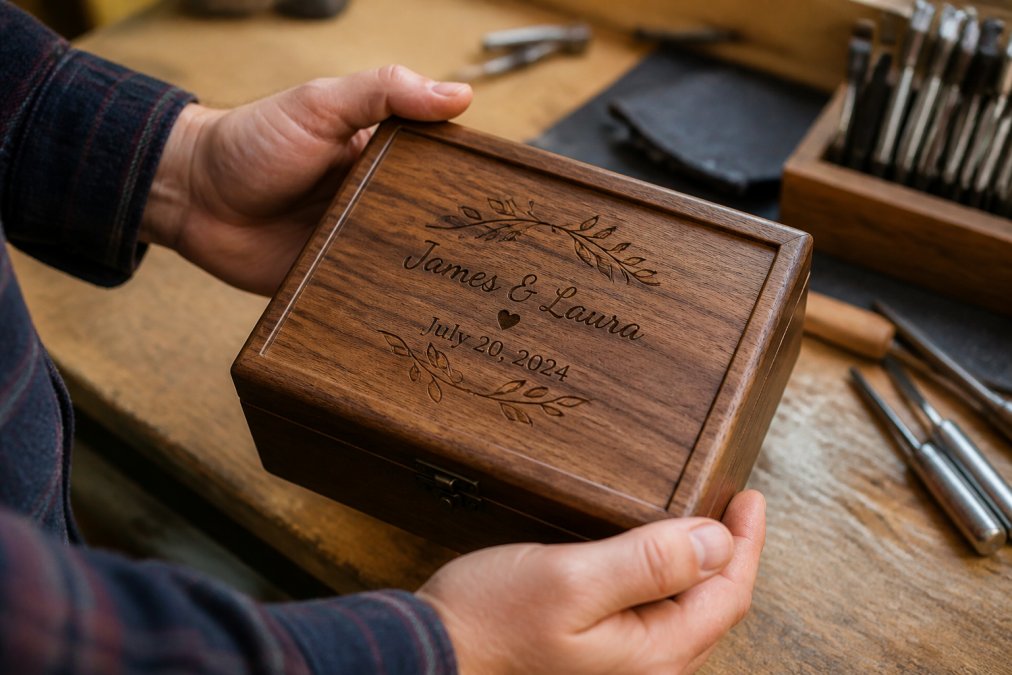
A common mistake is treating the engraving like a greeting card. Long messages crowd small surfaces; a few well-chosen words, a date, and a name usually beat a paragraph.
Weddings, Anniversaries, and New Homes
Wedding and anniversary pieces work best with names, a wedding date, and one short line. Popular options include:
- Names plus the wedding date
- "Est. 2026" for a new home or marriage
- A shared vow or inside joke, kept to five words
- Coordinates of a first home or honeymoon spot
For new homes, a family name and the move-in year turn a simple house sign into a keepsake.
Graduation, Retirement, and New Babies
Graduation and retirement gifts call for the achievement and the year; a new baby gift needs the full name, birth date, and birth weight. These details turn an ordinary item into a keepsake.
Custom Gift Message Examples That Say the Right Thing
The best custom gift messages are specific, warm, and short. Generic lines like "Best Wishes" feel mass-produced; naming the person and occasion reads as thoughtful.
Here are fill-in-the-blank templates you can use today:
[Name], for [occasion], with all our love. [Year]
[Name], [years] years of [achievement]. Thank you. [Year]
Personalized Gift Etiquette: What to Include and What to Avoid
Personalized gift etiquette comes down to respect and accuracy. A misspelled name or a guessed milestone turns a thoughtful gift awkward, so confirm the spelling, date, and relationship before you commit.
What to avoid:
- Nicknames the recipient dislikes
- Inside jokes only you understand
- Religious or political messages unless you're certain
- Dates you haven't double-checked
- Anything that could embarrass the recipient in public
Technical File Requirements: What to Bring Your Engraver
The difference between a crisp engraving and a blurry one is almost always the file, not the machine. Treat this section as the pre-flight checklist that saves you a redo.
Vector vs. raster: know which one you have
Two families of image files behave very differently under a laser or rotary engraver.
- Vector files describe shapes with math, points, lines, and curves. They scale to any size without losing sharpness. Formats: SVG, PDF, AI, EPS, DXF.
- Raster files describe a grid of pixels. They have a fixed resolution and get soft or blocky when enlarged. Formats: JPG, PNG, GIF, TIFF, HEIC (the default on most phones).
Resolution math for photos and raster art
A common rule of thumb for print and engraving is 300 pixels per inch (PPI) at the final output size. The number to check isn't total pixel count but pixel count divided by the engraved size.
A quick way to sanity-check:
- Decide the finished width in inches (say, a 4-inch photo panel).
- Multiply by 300. You need at least 1,200 pixels across for that panel.
- Open the file's properties and confirm the width in pixels meets or beats that number.
What actually causes blurry engravings
- Screenshots. A logo screenshot is a raster copy of a screen render, usually 72-96 PPI, and will pixelate.
- Social media downloads. Platforms re-compress uploads, so the saved file isn't the designer's original.
- Low-res logos from a website header. Website images are often served at 1x or 2x screen resolution, not print resolution.
- Photos of photos. Photographing a printed photo adds glare, skew, and resolution loss.
Text, fonts, and spacing
Text is the easiest thing to get right and the easiest to get wrong.
- Send the exact wording, spelled out, with the capitalization and punctuation you want. Don't send a photo of handwriting unless you want it matched.
- If you have a brand font, send the font file (TTF, OTF) or convert the text to outlines in a vector file. Otherwise, most shops have standard engraving fonts and can recommend one.
- Very thin strokes and small serifs can disappear at small sizes; a clean sans-serif holds up better on a charm than an ornate script.
- Leave breathing room. Text set edge-to-edge looks cramped; a small margin reads as intentional.
A simple handoff checklist
Before you send files to any engraver or printer, confirm:
- Vector file for any logo, monogram, or line art (SVG, PDF, AI, EPS, or DXF)
- Raster file at 300 PPI or higher at the final engraved size for any photo
- Exact text, spelled out and double-checked, including capitalization
- Font name or font file, if a specific typeface matters
- Finished dimensions in inches, so the shop can scale correctly
- A note on placement (centered, top-left, wrapped around a curve)
DIY vs. Professional Customization: Which Gets Better Results
Most gift guides say 'just DIY it' or 'just hire a pro' without explaining where the line sits. Here's a practical way to decide, based on what you're making, how many you need, and how bad a mistake would be.
What DIY actually involves
Each has a real learning curve: expect several evenings of test cuts and burned scrap material before anything looks gift-worthy.
Where DIY genuinely wins
- One-off, low-stakes items. A name on a wooden toy box, a stencil on a tote bag, a simple monogram on a cutting board.
- Items you can remake cheaply. If a blank costs a few dollars, a mistake is annoying, not devastating.
- Projects where the handmade look is the point. Slightly imperfect lettering on a hand-painted sign reads as charming. The same imperfection on a wedding gift reads as careless.
- When you already own the equipment. If the machine is already in your garage, the marginal cost of a project is materials and time.
Where professional customization wins
- Anything with a deadline you can't miss. A wedding, a graduation, a retirement party. A failed DIY attempt the night before is not a recoverable situation.
- Bulk orders. Running the same design across 50 tumblers or 200 awards requires consistent placement, consistent depth, and consistent color. That's a jig-and-fixture problem, not a talent problem.
- Curved, coated, or delicate surfaces. Engraving around a tumbler, through powder coat on a metal bottle, or onto glass without cracking it takes the right machine and the right settings.
- Anything with a logo. Brand marks have specific proportions and clear-space rules. A stretched or recolored logo undermines the whole point of a corporate gift.
- Photos and fine detail. Continuous-tone photo engraving is a different skill from cutting vinyl, and the results on a hobby diode laser are noticeably coarser than on a professional fiber or CO2 system.
The honest trade-off
| Factor | DIY (craft cutter or hobby laser) | Professional shop |
|---|---|---|
| Upfront cost | Machine plus materials | Per-piece pricing |
| Time to first good result | Several evenings of test cuts | One file handoff |
| Detail ceiling | Limited by hobby hardware | High, especially for photos and fine text |
| Consistency across a batch | Hard to hold | Repeatable with jigs and fixtures |
| Cost of a ruined blank | You eat it | Usually covered by the shop's process |
| Best for | Practice, simple text, one-offs | Gifts, bulk orders, logos, deadlines |
Corporate and Bulk Custom Gifts: Branding That Doesn't Look Cheap
Bulk orders fail when branding looks rushed: an oversized logo, clashing font, or cheap materials all signal "mass-produced." Good corporate gifts use one clean logo, consistent placement, and quality items people keep.
For employee recognition and client appreciation, keep it simple:
- One logo, correctly sized
- A neutral, professional font
- Quality materials over flashy design
- Consistent placement across the whole order
Sustainability and the Psychology of Personalization
Personalized gifts last longer, and that's the quiet sustainability win. When someone keeps a custom piece for years, it doesn't end up in a landfill. The U.S. Environmental Protection Agency's guidance on reducing waste notes that reusing and keeping durable goods longer cuts waste.
Conclusion
Choosing what to put on custom gifts is easier once you focus on names, dates, and a short sentiment. The hard part is clean details and files.
Frequently Asked Questions
What are some good ideas for personalized gifts?
Engraved drinkware, monogrammed jewelry, custom home decor signs, and etched keepsake boxes work for almost any recipient. For weddings, put the couple's names and date on a serving tray. For graduates, engrave their degree and class year on a pen set. For corporate clients, a custom-logo desk accessory feels thoughtful without being impersonal. The best custom gifts reflect something specific about the recipient, not just their name.
What are some good messages to put on gifts?
Keep it short and specific. Good examples include 'To the best chapter yet' for a graduate, 'Home is wherever you are' for a new homeowner, or 'Est. 2026' for a wedding gift. For corporate gifts, a simple 'Thank you for five years' works better than a slogan. Aim for under ten words so the engraving stays clean and readable on smaller items.
How do you choose the right engraving for a gift?
Match the engraving to the item and the occasion. Fine script suits jewelry and glassware; block lettering works better on wood and metal. Consider where the text will sit, how large it needs to be to read clearly, and whether the recipient will display it or use it daily. Ask your engraver for a digital proof before committing, especially on bulk orders.
How can I make a custom gift feel more sentimental?
Use details only the recipient would recognize: a nickname, an inside joke date, coordinates of a meaningful place, or a handwritten note recreated in engraving. Pairing the engraved item with a short handwritten card adds warmth that a machine finish alone cannot. For milestone gifts, include the year or the specific achievement rather than a generic greeting.